Monday, January 18, 2016

UPDATE- Etisalat Chatpack Now working with TweakWare 2016


Hello guys, it a good thing to know that you guys are Enjoying the Best and we will still do our possible Best to make sure you surf the Internet For free.

This post is Just to Inform you Guys that Etisalat Chatpack is now working Again with TweakWare VPN…

If you are New to this Tweakware VPN Click Here

All you Have to do is to Download the Latest Tweakware from Playstore .
Navigate to Settings , then scroll down to Bundled Setting , *Tick* Use bundle settings


See - How to Share Your AndroidVPN
internet Connection to AnyOther
Devices


Then click on Select bundled setting and choose ETISALAT CHATPACK 1
.

That's all. Go back choose a Server and connect..


NOTE That as a free user You are only Limited to 1Gb bandwidth Daily which is not fair enough , but the good news is that you can Bypass it. For how to bypass Tweakware Bandwidth limit Click Here

Checkout the Psiphon Settings Here


Video Tutorial


Sunday, January 17, 2016

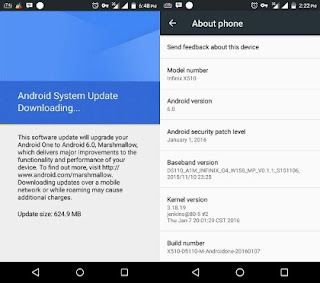
How to Upgrade Your Infinix Hot 2 Android One to Android 6.0 Marshmallow

The long awaiting official Android 6.0 Marshmallow OS update has finally arrived for the first Android One phone launched in Nigeria - Infinix Hot 2. The update is available via OTA (Over-the-Air) so, if you own an Infinix Hot 2 smartphone, you should get the notification anytime soon. Smart guys who can’t wait for the Android Marshmallow roll-out, can go ahead and flash the update manually, just that you must know what you are doing very well, because Shelaf will not be responsible for any damage that would occur on your device after following this procedure.


It is important to back up your files, contact and essential apps before you begin, because the flashing process will re-brand your smartphone and thus clear all your important data and files. Follow the procedures below carefully to update your Infinix Hot 2 Smartphone to Android 6.0 
Materials Needed
» Must be running on Android One Stock Rom - Download it here
» Infinix Hot 2 Stock Recovery - download it here
» VCom Drivers - download here
» SP Flash Tool - download here
Follow this link instruction to flash your Infinix hot2 Stock Rom: http://www.gistpluz.com/2015/07/how-to-flash-mediatek-stock-roms-with.html
Once you are done with the above, then you are set to install Android 6.0 MarshMallow on your device.

» Also Download Android 6.0 Marshmallow OTA File Here (624.9MB)
 
 
How to Flash Marshmallow on Infinix Hot 2

1. Once you’ve downloaded the Android M zip file, Rename it to update.zip
2. Place it on the root of your SD Card (it shouldn't be in any folder)
3. Power off your phone
4. Hold Volume Up + Power Button
5. Release power button and tap volume up once you see the "Infinix" Logo
6. It will show you a dead Android robot with a red sign
7. Press Volume Up or Volume Down (device dependent) to get into the stock recovery
8. Scroll down with Volume button to "Apply Update from SD Card"
9. Scroll down to the update.zip and select with the Power Button.
10. Allow it to nstall and once installation is done, reboot your system.
After rebooting, you should now have a new device running Android 6.0. If you’ve been having problems with your Infinix Hot 2, hopefully this update will make things both new and good.

Our Top Best Android Phones in 2015: Our Top 10 pick in Nigeria


If you are reading this post, you are probably looking for a phone to buy. Luckily, there are more than enough of them in the market, the BUT there is which one should I buy? In 2015, we witnessed a lot of new release and new innovation. With the long list, we are able to provide a decent list of phones to consider buying.
Here in Techlug, out of various selection available in the market to buy with variations in screen size, processor, camera quality, software features and design, we have taken our time to shortlisted the top 10 android phone 2015, putting into consideration critical factor like price, performance, battery life, specs and design. Though most of this phone are budget friendly phone and only a few flagship made the list.
Here is a selection of our best android phone 2015;


Tecno Phantom 5

 With a fingerprint sensor and huge specs like 3GB Ram, Octa-core processor clocked at 1.3GHz, superb 13MP camera and a huge 3000mAh battery capacity, calling it a flagship is not an overstatement. No doubt, phantom 5 is currently the best phone released by Tecno Mobile.
tecno phantom 5

Tecno Phantom 5 Quick Specs
  • OS: Android 5.1 Lollipop
  • Screen size: 5.5-inch HD IPS display
  • Resolution: 1080 x 1920 pixels
  • Dimension: 151 x 75.8 x 6.8 mm
  • Processor: 1.3 GHz octa-core processor
  • RAM: 3GB
  • Storage: 32GB Internal storage (MicroSD support)
  • Battery: 3000 mAh non-removable battery
  • Rear camera: 13MP
  • Front camera: 8MP
A price tag of N70,000 seems high, but frankly speaking, it worth it, the phone got it all.


Innjoo Fire

 A superb mid range phone from the stable of Innjoo, a 5 inch phone with a screen resolution of 960 x 540, packs with Medialtek Quad core processor cloaked at 1.3GHz with 2GB ram that gives a smooth multitasking experience.

Innjoo Fire
Innjoo fire Quick Specs
  • OS: Android 4.4.2 (KitKat)
  • Screen size:5.0-inch
  • Resolution: 720 x 1280
  • Processor: Quad-core, 1.3GHz
  • RAM: 2GB
  • Storage: 16 GB Internal storage (MicroSD support)
  • Battery: 2500mAh
  • Rear camera: 5MP with dual led flash
  • Front camera: 5MP
With a price less than N20,000 and a whooping 2GB of Ram which gives an impressive performance, innjoo fire remains the best mid-range Android phone you can get right now.


Xiaomi Mi4

 Xiaomi made its way to Africa market in 2015 and since then threatening brands like infinix, tecno and others with their competing specs packed in their device. The Xiaomi mi 4 comes with a metal body frame that has a similar design to that of iPhone 6. It does not made our list just for the awesome design but with jaw-breaking specs, 2.5ghz Snapdragon processor, 3GB Ram and 13MP rear camera and 8MP front camera.
 xiaomi-mi4
XIAOMI MI 4 QUICK SPECS
  • OS: Android 5.1 Lollipop
  • Screen size: 5.0-inch HD IPS display
  • Resolution: 1080 x 1920 pixels
  • Processor: 2.5 GHz octa-core processor
  • RAM: 3GB
  • Storage: 16GB Internal storage (MicroSD support)
  • Battery: 3080 mAh non-removable battery
  • Rear camera: 13MP
  • Front camera: 8MP
All these goes for around less than N58,000. Cool… Huh?


Tecno Camon C8

 A powerful 5.5inches phone packed with amazing camera with great quality to the extent it’s being compared to that of an iPhone 6.

https://blogger.googleusercontent.com/img/b/R29vZ2xl/AVvXsEjQqWUyK32Bk0mVEQr2lYJtMhcxvkCNYyVv-Bmd0NyVZVPju7BjTDxE7eDtITJfalKMdGSbw4PRujddP2O4COoQ_qQfbWfFK1fVgYeRDhj9U7BjgoPJEyDHmdRTUwkk21-lbJPX81bL-Tc/s320/tecno-camon-c8.png
Tecno Camon C8 Quick Specs
  • OS: Android 5.0 Lollipop
  • Screen size:5.0-inch
  • Resolution: 720 x 1280 pixels
  • Processor: Quad-core, 1.3GHz
  • RAM: 2GB
  • Storage: 32GB Internal storage (MicroSD support)
  • Battery: 3000mAh
  • Rear camera: 13MP with dual LED flash
  • Front camera: 5MP
If you are the type that takes phone camera serious, camon c8 is a right choice for you, as it shoots high quality photos both rear and front camera with led flash perfectly placed beside then. The design is another interesting part, despite the fact that it’s a 5.5inch, it maintains the premium look.
Camon c8 complete review here

Infinix Note 2

 As at the time of writing this piece, Note 2 is the latest infinix phone after the zero 3 and the only 6 inches phone produce by infinix, with a sleek design, it comes with a powerful Quad-core processor clocked at 1.4GHz, and also a battery capacity of 4040mAh


infinix note 2
Infinix Note 2 Quick Specs
  • OS: Android 5.1 Lollipop
  • Screen size: 6.0-inch Full HD capacitive touchscreen
  • Resolution: 1080 x 1280 pixels
  • Dimension: 159.5 X 82.5 X 9.3 mm
  • Processor: Quad-core, 1.4GHz
  • RAM: 1GB/2GB
  • Storage: 16GB Internal storage (MicroSD support)
  • Battery: 4040 mAh Li-Polymer battery
  • Rear camera: 13MP with dual LED flash
  • Front camera: 2MP

Note 2 comes in two different variant, one of 1GB Ram and other one with 2GB, though the Ram is different but they both have the same specs.

Innjoo 2

 Another beautifully made phone by Innjoo made the list, Innjoo 2 is powered by MediaTek processors clocked at 1.3GHz, it comes with 2GB Ram and a battery capacity of 3200mAh.


innjoo_2

INNJOO 2 QUICK SPECS

  • OS: Android 5.1 Lollipop
  • Screen size: 5.0-inch IPS LCD capacitive touchscreen
  • Resolution: 720 x 1280 pixels
  • Processor: 64-bit Octa-core 1.3 GHz
  • RAM: 2GB
  • Storage: 16GB internal storage
  • Battery: 3200mAh Li-Polymer non-removable battery
  • Rear camera: 13 MP with autofocus, LED flash with Live Photos, panorama mode and face beauty optimization mode
  • Front camera: 5MP
Innjoo 2 is a flagship with premium design with a price tag that wouldn’t stress your pocket much. It goes for around N23,500 – N28,000
Next page........


Infinix Hot Note

 Hot Note is the first 5.5inches phone to be produced by infinix and also the one that first featured the monster 4,000mAh battery capacity, this phone recorded a large number of sales as reported by Jumia, one of the biggest Nigeria Online shopping store.
Infinix hot note pro review

INFINIX HOT NOTE QUICK SPECS
  • OS: Android 4.4 KitKat upgradeable to Lollipop
  • Screen size: 5.5 inch HD screen
  • Resolution: 720 x 1280 pixels
  • Processor: 1.3ghz Quad Core processor
  • RAM: 1GB/2GB
  • Storage: 16GB/32GB internal storage
  • Battery: 4000mAh li-ion battery
  • Rear camera: 8MP
  • Front camera: 2MP
  • Other Features: Fast Charge.
Hot Note is it a phablet with superb specs, the pro version is the one that comes with 2GB, this makes it more interesting.

Infinix Zero 3

 Zero 3 is the third of infinix hero family, and the best of all so far, it comes with a whooping 3GB that aids smooth multitasking, it has a premium design covered with corning gorilla glass 3 both front and back.


infinix zero 3 specs 

Infinix Zero 3 Quick Specs
  • OS: Android 5.1 Lollipop
  • Screen size: 5.5-inch Full HD capacitive touchscreen
  • Resolution: 1080 x 1920 pixels
  • Dimension: 151 x 75.8 x 6.8 mm
  • Processor: 64-bit Octa-core 2.2 GHz
  • RAM: 3GB
  • Storage: 16GB/32GB internal storage
  • Battery: 3030mAh Li-Polymer non-removable battery
  • Rear camera: 20.7MP autofocus, LED flash with Live Photos, panorama mode and face beauty optimization mode.
  • Front camera: 8MP
  • Other Features: Corning Gorilla Glass 3, Fast Charge.
Zero 3 camera is something else, a 20.7MP rear camera and 8MP of high quality, I bet selfie lover would find this interesting.


What do you think about this? comments........

HTC One X9 Specifications, Features and Price


The HTC A9 that was released few months back in 2015 was a great smartphone to behold and as a reward, the A9 enjoyed huge sales and HTC can’t deny they made much cash. Well as a result of that success, HTC launched HTC One x9 which comes with wider HD screen for your viewing pleasure. In addition to Packing a large Full HD display, the device delivers superb performance with an octa-core processor.

THE DESIGN

There is nothing much to say about the design of the latest HTC One x9 because keeping everything same is like a culture to HTC. The X9 sports an aluminum body, with a bit of plastic on the rear close to the camera. The HTC One X9 phablet comes in 7.99mm thick and weighs 174 grams. But every feature of this smartphone plays out on a 5.5 inch display screen.

HTC One X9 Full Specifications


Here are the specs of the HTC One X9 Phablet:

General Features

Platform: Android 6.0 (Marshmallow)
Processor: Octa Core Processor (Mediatek MT6795 Helio X10)
GPU: PowerVR G6200
Memory: 3GB RAM
Colours: Black,White
Dimension: 153.9 x 75.9 x 8 mm
Weight: 170g
SIM Type: Nano SIM
SIM Count: Dual-SIM, Dual-Standby
Display

Display: 5.5-inch AMOLED Display, 1080 x 1920 pixels (401ppi)
Display Protection: Corning Gorilla Glass
Camera

Rear Camera: 13MP Camera, 2160p ultra HD, 4k Video
Rear Camera Features: Autofocus, dual-LED (dual tone) flash, Geo-tagging, face detection, HDR, panorama, OIS
Front Camera: 5MP Camera, 1080p HD Video
Storage

Built-in Storage: 32GB
Memory Card Support: up to 200GB
Bundled Cloud Storage: –
Network Support

2G GSM: 850 / 900 / 1800 / 1900MHz
2G CDMA 1X: No
3G WCDMA: 850 / 900 / 1900 / 2100 MHz
3G CDMA EVDO: No
4G LTE: Yes
Internet & Connectivity

GPRS: Yes
EDGE: Yes
3G/WCDMA/HSPA: Yes
HSPA+: Yes
CDMA EVDO: No
4G LTE: Yes
WLAN: Yes, Wi-Fi 802.11 a/b/g/n/ac, dual-band, Wi-Fi Direct, DLNA
Wi-Fi Hotspot: Yes
Bluetooth: Yes Bluetooth 4.1, A2DP, apt-X
NFC: No
Infrared Blaster: Yes
USB Port: Yes USB 2.0
Messaging

SMS/MMS: Yes
Instant Messaging: Yes
Push Emails: Yes
Email Protocol: –
Entertainment

Music Player: MP3/eAAC+/WMA/WAV/FLAC player
Video Player: MP4/H.264/WMV player
FM Radio: –
Loudspeaker: Yes
3.5mm Jack: Yes
Navigation

Navigation: Yes, with A-GPS, GLONASS
Maps: –
Sensors & Control

Digital Compass: Yes
Accelerometer: Yes
Proximity Sensor: Yes
Light Sensor: Yes
Barometer: No
SpO2: No
Pedometer: No
Heart Rate Monitor: No
Gyroscope: Yes
Fingerprint Scanner: No
Iris Scanner: No
Intelligent Digital Assistant: Yes
Motion Sensing / Gesture Control: No
Voice Control: Yes
Other Features

Video Streaming: Yes
Active Noise Cancellation: Yes (with dedicated mic)
Wireless Charging: No
Built-in Mobile Payment: No
Water Resistant: No
Dust Resistant: No
Image Editor: Yes
Video Editor: Yes
Document Viewer: Yes
Document Editor: Yes
Battery

Battery: 3000 mAh Li-Ion Battery (Non-Removable & Fast Charging)
Talktime: up to 15 hours (3G)
PRICING AND AVAILABILITY

We expect the new HTC One X9 in Nigeria soon at a starting price of N95.000


So what do you think about this Gadget?

Drop a comment and Share...........

Tuesday, January 5, 2016

2016: See Expected Tech Products toBe Launched

The year 2016 promises to be a great year not only our lives as humans but also in the world of technology. To make this a reality, many tech companies have gone to work just to roll out something new for the new year. Well we are not sure if we will be getting the launching of these tech products and gadgets this January but what we do know is that they should all be up for launching before September. So what are we to expect?


1. LATEST IPHONE 7
Yeah, Apple is underground working to replace the current iPhone 6s with something latest. I’m sure you love the iPhone 6s but you need to wait until you see the latest iPhone 7 because with Apple anything is possible.
Rumours have it that the latest iPhone 7 will sport great features like an edge-to-edge display, seem perfectly plausible while others including waterproofing and the loss of the headphone jack are more farfetched. We will just keep quiet and wait for this.

2. MICROSOFT SURFACE BOOK
We loved the swag when Microsoft boasted that the current Surface 4 Pro is the “ultimate laptop.” So we are really keeping our fingers crossed to see what Microsoft will call the Surface Book laptop it is planning to launch around September. When the Microsoft Surface Book shows up it will come with at least 128GB of storage, a Core i5 Skylake processor and 8GB of RAM. The high resolution screen which detaches keyboard via the Dynamic Fulcrum Hinge from the keyboard which has a graphics card in it. We can’t wait for this.

3 . LATEST SAMSUNG GALAXY PHONE

We are not particularly sure what Samsung plans to call this one but all we know is that you will be getting a replacement for the current Samsung Galaxy S6. We don’t expect the rumoured Samsung galaxy phone to look any different from the Galaxy S6 but at least we will be getting some changes such as a squarer home button. The biggest new feature will be a pressure sensitive screen to rival the iPhone’s 3D Touch but USB Type-C and the return of the Micro-SD card slot. So let’s hope this comes real soon.

2016 Latest Etisalat Chat pack settings for Psiphon

Many of my Readers Have been disturbing me for the new Etisalat Chat pack settings, Which i have been using for a while, but i want to confirm that it is really working so, Reason is that you guys won't have to be looking for working IP Address. But the below settings is the Ultimate settings so far, because you guys won't be looking for IP Address every day.

I guess you guys already knows how to subscribe for the Etisalat Weekly Chat pack ,but for those of you that are still new to chatpack, The subscription code is *343*5*6#…

Latest Etisalat Chat pack settings for Psiphon

DOWNLOAD PSIPHON101 HERE

1. Create a new APN with the below settings

Name - Etisalat chat pack
APN - etisalat
Apn type - default
leave the rest blank


Now open PSIPHON and set with below settings.
- tick Remove Port
- Proxy type - Real Host
Custom Header - X-ONLINE-HOST
-Proxy server - Skype.com


- Real Proxy Type - HTTP
- Real proxy Server - 10.199.212.2
- Real proxy port - 8080


Then Save your Settings.

Click More Options

- Tick connect through HTTP proxy

- Tick Use system Network Settings …


That's All.. Then Go back and Connect..

Video tutorial Loading Very soon

comment if you have Any problem or drop your testimony if this Worked for you

INCASE THE ABOVE PROXY SERVER DIDN'T WORK.. CLICK HERE TO GET NEW WORKING PROXY SERVER

Video Tutorial...

watch video tutorial here


Please Don't leave without Sharing this post

Wednesday, December 30, 2015

AndroidTutorialHow to boot Android phone intosafe mode to troubleshoot problems


Android device might start showing up their naughty behaviour, issues like lagging, freezing or apps misbehaving, there is a special mode to troubleshoot these kind of problems, Safe mood, whereby all third party apps you installed on your Android phone would be disabled, this will enable you to fix any error caused by a misbehaving app or settings you mistakenly tampered. A typical example of this is when you installed an app and all of a sudden your android phone start misbehaving, without stressing yourself much, it’s obvious it’s due to the app you installed, common issue with this is the app settings clashing with your phone system settings.

To fix this type of error, you have to disable all third party apps since you can’t say exactly which app is causing the issue, here is how to fix it;

Booting Android phone into safe mode

For most Android phones, to enter safe mode, you will have to press and hold the power key to bring the power options; power off, reboot and airplane mode, you wouldn’t see the safe mode option, it’s actually there but hidden under the power off option, to access it, you will have to press and hold the power off option for some seconds, this will pop up a message asking “Do you want to reboot into safe mode?” press OK to confirm.Your device will now reboot into safe mode.


But this might be different on your own device, if that is the case, you may need to press volume down key or both volume buttons together when restarting to enter Safe Mode.

Now that you have reboot your Android phone to safe mode, its operating system would be reverted to default settings and all third party apps wouldn’t work, they will be idle for the main time, then you can be able to narrow down the app tampering with your phone system. You can uninstall the app or clear the data cache for any suspicious app.

How to Exit Safe mode


It’s pretty simple, reboot your Android phone to exit safe mode. Note this, you might lose some app settings to safe mode process, not all app though. Also, apps like Facebook and Twitter might prompt you to login again, this is the due to the fact that your login details have been cleared.

If you are having any issue with this process, let me know.

Hope it helps!

Kindly share!

Saturday, December 26, 2015

Surf Unlimitedly with his Magic IP Update For Etisalat Unlimited Free Surfing On Android Device With N0.0


since MTN has blocked our mean of surfing the Net for free, Etisalat on the other hand is surifng the Net for free with the aid of psiphon,  so n this article am going to guide you guys on how to surf the NET with this old tweak.. it very simple, just make sure that you have the latest PSIPHON. click here to download 
to use this tweak, make sure you dont have any data or airtime on your sim card.

open your psiphon and configure as below,


In your Psiphon under Proxy type choose reverse proxy….


Then in your proxy Server, input;

instagram.com
or
mobile.etisalat.com.ng%2F%3a@41.73.228.136

then in real proxy server , imput any of this IPs and Ports

37.187.1.118: 3128….

149.202.56.98: 8888…..

5.101.168.240: 3128…..

79.120.72.222: 3128….

save it and click on the More options , set it as below with the Ip and port you want.

 
thats all. then go back and it the start button.

Note: This tweak usually takes time to connect, like 5 to 10mins.

… So, you need to exercise patient before it shows connected. Once the Psiphon connected, you will feel the speed, especially when streaming and downloading.


ENJOY............................. AND DONT FORGET TO SHARE THIS POST...

Thursday, December 24, 2015

download the Infinix zero 2 (V2.0) OctOs Lollipop Rom

Infinix zero 2 (V2.0) OctOs Lollipop Rom


I bring to you good news for all Infinix Zero 2 users, This Infinix zero 2 (V2.0) OctOs Lollipop Rom.
Built and Based on the Lollipop ported by Amr_virusx from Infinix Xclub all credits goes to him for putting so much hard work to port this beautiful custom rom for Infinix Zero 2 users.


infinix hot rom

HOW TO INSTALL OctOS ON INFINIX ZERO 2


1- you need to be on kitkat (Lollipop Users Please Downgrade Back to KitKat if you need to install this rom)


2- TWRP recovery must be installed on your phone (
Download It From Here).   


3- download the rom and gapps and copy them to sdcard.


4- boot to recovery.

5- wipe cache – dalvik cache – system.

6- install rom.


7- install gapps.


8- wipe cache – dalvik cache.


9- reboot.


10- turn off location in SETTINGS, reboot your phone.


11- enjoy the rom.


OCT OS Features:

 
1- All CM 12.1 features + OctOS features.

2-
The battery life is very good.

3-
Call quality is so good.

4-
rooted.

5-
Look at the screenshots.
Bugs:

video playback from youtube.com not working in browser (cm12 BUG).

Change log:

1- GPS working now (only for google maps).
2- video playback working from youtube app only.
3- sound recording working now fine at any quality.
4- video recording working now fine from the main camera app.
5- AudioFX updated and working for speaker.
6- added Xclub, DOLBYAtoms, ScreanCast, RootExplorer and TitaniumBackup apps.
7- changed the gallery app to a new awesome one.
8- changed the main camera app to a new awesome one.
9- fixed the MTP when connected to PC.


SOURCE- AYOPROXY.COM

Tuesday, December 15, 2015

Mtn Introduces Weekend Bundle capped at 3Gb for N300


This info is online for some days now, but I want to do some research on it before I post it here.
Like we all know, MTN is giving out 3GB of data for just N300 recharge card to their customers on night weekends plan.
It was actually a nice plan cause you got to browse for all weekends.

The nice part of this is "if you can't use the MB finish till the end of that weekend, your account will be automatically charge the next weekend and the remaining MB from previous weekend will roll over with another 3GB of that present weekend", which makes it 3GB + previous weekend remaining MB.

How to subscribe:-

Load a N300 recharge card on your MTN Card and dial *123*3*1*5*2#.

There is actually a "Discount Coupon" people are using about this new plan.

It was said that if you don't have up to N300 on your SIM, if you try the code above, you will get a "Transaction Failed" error but you will also be credited with 3GB and N20 will be charge from your SIM.

Just Dial *123*3*4# to check Your Balance..

NOTE: it works best on MTN iPulse subscribers, so you might want to migrate to MTN iPulse if you are not there already.

Feel free to ask Question about this via comment below.

Enjoy..

Infinix Zero. Buy cheaper with Jiji.ng


Designing Infinix Zero was the result of numerous sketches, engineering processes and material selection. As the result, the users got highly resistant shell much liter and tighter than steel, ultra-resistant to damages and great to feel in your palm. High graphic resolution lets you enjoy media content, and great touch screen reaction makes the work fast and productive. Camera provides the possibility to shoot great pictures even in the dark environment.

Moreover, it works just with a single wave of your hand!
You can buy a great cheap device at Jiji.ng. It is the place, where you can find anything without any problems. Jiji is the classifieds with the constantly growing number of users. Everyone can register and post an advert. The service is available all over the country. Due to the smart interface, it is very convenient and simple in use. Scan the list of items,

compare different offers, pick something you like and don’t hesitate to contact a seller.


iji is a place where you can buy everything cheaper than in any shop. People leaving adverts here are all real people, who have something to offer. That’s why the prices are so incredibly pleasant here – you don’t have to deal with mediators or pay extra charges for using the services.


CLICK HERE TO VISIT WEBSITE 

Friday, November 27, 2015

how to bypass tweakware bandwidth limit


This article features the best tips for using Tweakware for unlimited downloads without stress. It is divided into 3 parts which include how to fix proxy socket connection failed in Tweakware, how to bypass the daily bandwidth restriction of 100mb and get free browsing and unlimited downloads especially on Etisalat. Finally, we will show you how to get a stable uninterrupted internet connection for this tweak and stop it from disconnecting at intervals. For best performance, you will need to download the latest Tweakware version 0.7 from here.

firstly you need to know how to configure tweakware to work  click here to see how


How To Fix Proxy Socket Connection Failed In Tweakware - 


1. Download, install and Run your Tweakware v0.7 app, locate the Option button at the top right corner and tap on it to take you to settings.


2. Select “Settings” and first go down and tap on “Reset Setting” then go back up and ta on “Network Settings”.

tweakware-settings-ityunit


3. Check the box beside “Connect Via HTTP Proxy” to enable proxy and configure as follows:

·         Proxy Host: mobile.facebook.com
·         Proxy Port: 8080
·         Enable Proxy Tweaks
·         Click on Proxy Tweaks and Enable Reverse Proxy
Then go to Custom Headers and delete the default wap.ferry.com then add:
X-Online-Host: mobile.facebook.com
Take Note that there is one space between the “:” and “mobile” just like it was in the default “: wap.ferry.com”.
4. Finally, go back to Server Settings and Change Port to 3128


How To Bypass And Extend Your Daily Restricted Bandwidth 

And Get Unlimited Browsing And Downloads - 


1. Confirm that your device is correctly rooted
2. Click Here to Download (86kb) and install Android ID Changer
3. Run the Android ID changer and grant root permission
4. Backup your default ID either by Clicking on the download button sign or manually copy your real Android ID into somewhere else and save (so as to restore later in order not to void warranty).
5. Tap on the back button and click on the “+” sign above to generate a random ID for you.
6. Save New ID
Finally go back to your Tweakware and use any of the free servers (preferably the German Servers), you will be granted another free bandwidth for the day

How To Get A Stable And Better Internet Network Connection On Tweakware - ityunit.com

1. Go to Network Settings and go down to Connection Settings and check the box beside “Enable Keepalive”.
For the “Keepalive Interval”, type in “5” and for the “Keepalive Timeout”, choose “5”.
keepalive-tweakware-ityunit
2. Choose the country server instead of default server in the home page change it to “Netherland or Germany or Canada" and Click on CONNECT.
3. After successful handshake and authentication, press the back button and it will connect automatically.
Enjoy!!!
Applying these tips successfully will guarantee you a stable and better connection via Tweakware on Etisalat. So unless Etisalat network is very poor in your area, you would not be complaining of frequent disconnection issue again.
Please like our Facebook page, share this article on your social media by clicking any of the sharing buttons below and we do appreciate your comments.

pls Share this article

MTN FREE BROWSING CHEAT, DECEMBER CHEAT RELOADED


Free browsing tweak on MTN with music+ is here once again, get 150 MB data per subscription for free with MTN music plus data and reload it each time it finishes as many time as you want all day or get a SMS scheduler to send the sub code periodically. With this settings, you are guaranteed unlimited free downloads on mtn musicplus cheat. It is thatsimple on Psiphon and Simple Server settings.

 
mtn-musicplus-cheat-ityunit

How to Set Up Psiphon for Unlimited Browsing on MTN

1. With these settings, you can repeat the subscription as many times as you can but remember to opt out first when the mb finishes before subscribing again. Make sure you have zero naira
2. Subscribe and activate the MTN musicplus Bundle by text: MUSIC to 5900 then wait for the reply  or after some seconds Check your musicplus mb balance with the code: *559*2#
3. Click here to download and install the latest Psiphon handler 100


4. Open the installed Psiphon app and configure the handler as follows:
-          Proxy Type: Real Host
Under X-Online-Host,
-          Proxy Server: musicplus.mtnonline.com
Just leave the others


mtn-musicplus-ityunit


Tap on Save to close the Handler Settings. Then a pop up will appear and you have to choose “Tunnel whole device”
You will be taken to the main screen where you will go to the “Options” menu and select a region.
1. Select “Best Performance” in the ‘region select’.
2. Go down and locate “More options” under the “Handler” button.
3. Under the “Proxy Settings” Check the box beside “Connect through an HTTP” then select “Use the following settings”
-          Host Address: 10.199.212.2
-          Port: 8080
 
mtn-musicplus-settings-ityunit
 
4. Leave the others as default and go back to the main screen


To use Simple Android Server on Musicplus

1. Go to Local Server settings


2. Tick Use Global Proxy
3. Click General Settings
Proxy host: 10.199.212.2
Proxy port: 8080
Injection Query/Url: http:/musicplus.mtnonline.com
Injection host: musicplus.mtnonline.com
Injection line: press enter 4 times
4. Save and Start the SimpleServer

How to renew unlimitedly when the 150 mb finishes

1. Text Cancel7D to 5900 (to opt out of the plan first) then
2. Text D to 5900 and wait for the reply or after some seconds check your balance with *559*2#


 please dont leave without sharing this post................................

Wednesday, November 25, 2015

Cheap Data Plans for Android, iPhone, iPad and PC in Nigeria


MTN-Glo-Etsialat-Airtel-Nigeria


One of the rampant issues faced by most Android phone users and iOS users is the issue of cheap data plans for their smartphone, to get an affordable data bundle that will sustain you through internet browsing, chatting, downloads and the likes is a big deal if you are using Android phone, iPhone or iPad simply because of how much they deduct MB. Gone are those days of java phone where data plan is cheap and also a little megabyte will do you, reverse is the case when it comes to Android, iPhone and iPad.
Blackberry users enjoys cheap data plan on their blackberry phones but unfortunately enough, most of these data bundles does not work for android phone and iOS phones at least without tweaking, this is really frustrating and seems unfair to Android and iOS users. Some network provider offers cheap data plan for Whatsapp, BBM, Facebook, twitter and the likes for Android and iOS, but how manage will you be restricted to just one app, i guess this is not for every people, not for dynamic users.


In case you don’t know, the first blackberry phone running on Android OS is announced, Blackberry Priv
In this article am going to share with you the cheapest, most affordable and best data bundles you can use on your computer, android phones, tablets, iPad, iPhone and other smartphone.


Cheapest Data Plan for Android, iPhone, iPad or PC in Nigeria


These data bundles am about to share, they are the best affordable data plan in Nigeria right now and I have used it and still using most of them.

Cheapest Mtn Data Plan for Android, iPhone, iPad or PC in Nigeria


Mtn Night Plan 4.5GB for #2,500

Hey, don’t panic yet, is not only for midnight browsing, when you subscribe for mtn night plan, you would be given 3GB for night browsing and extra 1.5GB for daylight browsing totaling 4.5G for just #2500. Am using this mtn data plan on my android phone and believe me I have not for once regret using it. To activate mtn night data plan, load #2,500 then send 102 to 131. Or simply dial *123# and follow the commands in this order data services > My data plans > Night plan and select 4.5GBbnight @ 2500NGN
You can use mtn night plan for Android, iPhone, iPad and your PC. To use it on your laptop, subscribe for this plan on a phone and just turn on your phone hotspot and connect your PC to it.

Mtn 1GB for #1000

This plan works on all mobile phones and modem, in short any device using sim card, to opt in for this, visit any Mtn outlets or office and request for Mtn data, you can also get 2GB for #1800.
Mtn 2GB for #2,000
2GB at NGN2,000 data bundle plan. To activate, send “SPB” to “131″.

Cheapest Airtel Data Plan for PC, Android, iPhone or iPad in Nigeria


Airtel Blackberry Plan 2GB for #1500

This Airtel plan is another cheap data plan you can use, it works for Android, iPhone, and iPad, no tweaking. To subscribe to this plan load N1,500 and dial *440*16# or simply send Bbum to 440. To use this on your computer, follows the same step I mentioned in mtn night plan.

Cheapest Glo Data Plans for Android, iPhone, iPad or PC in Nigeria


Glo 3GB Blackberry Plan for #1000

This is one of cheapest unlimited data plan you can use. Don’t be surprise this works on Android phone CLICK HERE TO SEE HOW, it involves some little tricks, to use this glo bis plan,
Get a blackberry phone and insert your Glo SIM, load #1,000 and send comonth to 777, now wait for a message from Glo to confirm your subscription to the monthly blackberry plan, after that remove the battery and insert it again. You can now remove your SIM card from the blackberry device once the plan is activated. To use it for any non-blackberry device, go to phone network settings, create new access point names and set the apn to “blackberry.net”. Now you can start using it.
Another way to do this is to change your phone imei no to that of blackberry, you wouldn’t need a blackberry phone again, you just have to create new apn and that’s all.
Glo 1GB for #1,000.
It works for all device. To activate the 1GB at NGN1,000 data bundle plan, send “53” as a text message to “127”

Cheapest Etialat Data Plan for Android, iPhone, iPad or PC in Nigeria


Etislat 2GB for #2,000
This Cheap Etisalat data plan works on Android, iPhone, iPad, and PC. To activate, dial; *229*2*8#. To check your data balance, dial *228#


I believe you will surely find a cheap data plan that will suit you, don’t forget to share this with your friends on facebook, twitter and google+, you don’t know who might need it.


There is love in sharng, share now

Tuesday, November 17, 2015

Specifications of InfinixBig6 Infinix Note 2 with leaked photos of Infinix X600

We all can’t wait after reading the official announcement of Infinix Mobility about their new flagship device coming to stores near you on 29th of November 2015.
We can’t wait No More, so I finally got the leaked, think it has been released in some other countries in Africa. The phone is awesome
image
Screen Size :
6.0 inches

Operating System :
Android 5.1 XUI [Lollipop]

Battery :
4040mah Li-On Battery

Storage and Memory :
16GB Rom + 1.5GB Ram

Camera :
13mp back camera
2mp front camera

Chipset :
MTK OCTA CORE

And finally its going to be called Infinix X600 or the Infinix NOTE 2.

image

image

Infinix X600

image


What do you think about this Device? Will you get one? Let us know via the comments box.

How To Root Infinix Hot 2 X510 Without PC

Infinix Hot 2 Popularly referred to as “InfinixHottestOne”  this trending device has been in stores for a long time. Lots of people own this phone and still find it difficult to root it. 
image
Today I will guide you on “How To Root Infinix Hot 2 X510”.
DISCLAIMER : GISTPLUZ.COM can never be held responsible for anything that happens to your device. Try this at your own risk.

How To Root Infinix Hot 2 X510 

Be sure you download the Latest Version of Kingroot v4.5.2
Install Kingroot and Open the Application

image
Click on Start Root, let the rooting begin.
Be sure you’re connected to the Internet.

imageIf everything works well, you should be rooted within a twinkle of an eye.
It’s advisable you reboot after this process.
Let us know if it worked out for you via the comments box below.

Photo Credits : Wale Adekile : Geek.Ng


comment here if you have any other problem

Tuesday, November 10, 2015

how to root and change the Imei of Tecno Camon C8

The Tecno Camon C8 sounds more like a Camera name than a Smartphone. But a new smartphone from Tecno Mobile it is featuring a 13MP rear camera and 5MP Front Camera with flash. The manufacturer hypes the phone  as a Camera centric Smartphone.


Aside the Camera capabilities, Camon C8 which is a technically upgraded version of the Tecno Camon C5 features a 5.5 inch HD IPS display, 1.3GHz Quad processor, Android 5.0  Lollipop, 3000mAh battery, 1GB RAM, 16GB ROM expandable to 32GB via MicroSD card.


The Tecno Camon C8 is very stubborn device when it comes to rooting, because the popular and easiest apps such as Kingroot, Vroot, Framaroot, Tecnoroot, Rootgenius etc., are not working for it. The below tutorial will guide the Tecno Camon C8 users to Root and change the IMEI of their Smartphone.

Important Notice
After rooting your phone, it’s advisable to unroot before performing an OTA update or restoring factoring settings.

Materials Needed For Rooting
 
» PC with internet connection
» USB Cable
» SP Flash Tool - Download it Here
» SuperSU.zip - Download it Here
» TWRP for Tecno C8 by Team Hovatek - Download it Here
 

To Root Tecno Camon C8
 
 
» Save the SuperSU.zip that you downloaded to your phone's SD card
» Unzip the TWRP zip file that you downloaded and flash the recovery image to the phone using SP Flash Tool
» Now, boot your phone into TWRP Recovery Mode (by Holding the Vol Up and Power button simultaneously for 5 seconds)
» In TWRP Recovery, Choose install zip from SD card - to choose a zip from SD card use Vol up and down scroll up and down, then choose the Supersu.zip file from the root of your SD card.
Scroll to yes and install, after a successful flashing go back and reboot.

It is simple as that. You may download Root Checker from Play Store to verify your root privileges. After downloading, simply Install Root Checker, run it and you should get a success message after then.

All Credit goes to Team Hovatek for providing this guide in rooting Tecno Camon C8.


To Change Your Tecno Camon C8 IMEI to BB IMEI.
 
Note: It's not a must for you to root your Tecno Camon C8 before you can change it's IMEI, the below method of changing IMEI can work for your Tecno Camon C8 without rooting it, but rooting your phone will make you enjoy your phone the fullest.


1. First of all, you need 15 Digits Blackberry Generated IMEI. Simply download BBGEN. epic version here, to generate BB IMEI on your Android Device or Download GIPv4.1 Software to your PC here 
2. Also download and install MTK Engineering Mode from play store.  
3. Open it and click on MTK Settings
4. Then wipe your screen to left site to see Connectivity options.
5. Scroll down to CDS Information and tap on it.

Sunday, November 8, 2015

Hot- How to browse Unlimitedly With N0.00 on your Mtn Line


Hello guys, how is your weekend going? Hope you are still Surfing the Etisalat Unlimited browsing …

Not while ago I posted how to use HTTP INJECTOR WITH ETISALAT CHATPACK Click here to read it…


With #0.00 on your mtn line u can now surf
the net using Slow DNS.


Just follow the simple steps and you are good to
GO...

DOWNLOAD

"VPN Over DNS"
HERE…

Make sure to Use your default phone APN.

After that open your SLOW DNS and set as follow:

• Dont touch the first and second box, move to third
box and select any free server of your choice

• on the forth box you will see something of this
nature DNS-1 IP delete it and input this
IP 10.109.5.97

• tick on "Keep changing source port" and alsobtick on "Binary Query" and connect.

After that wait for the proper authentication
and client configuration.

Once it connects you are good. Just continue surfing but don't download because you must have an upgrade to tunnel premium server.


Keep surfing the net for free. Drop comment for clarifications.