Thursday, September 24, 2015

How to Fix Google Play Store that is not Opening

1. Clear the Google Play Store cache

In most cases when the Play Store's faltering, you just need to empty the app's cache. This is a storage area that will temporarily hold data which can then quickly be retrieved again without needing to be reloaded; in short, it helps the Play Store load quicker. To empty the cache:

Go to Settings > Apps. Tap All > Google Play Store then finally tap the Clear Cache button.


On the Play Store app , you can delete the cache, data and uninstall updates. / ©


2. Clear out your Play Store data 

Along similar lines to - but more drastic than - the first tip is deleting the data from the Play Store. This sets the app back to square one and gets rid of your saved information - hopefully including whatever was glitchy data was causing the problem.

As with the previous tip, go to Settings > Apps > Google Play Store but this time tap Clear Data.


3. Uninstall Play Store updates

Even this can help. Sometimes an update will do more harm than good to your Play Store app, so it makes sense to uninstall an update.

Go to Settings > Apps > Google Play Store then tap the button that says Uninstall updates.This will revert Google Play back to the original version (as it appeared when it was first installed on your device),Next, you'll need to find an oldser - but still recent - version of the Play Store app to download. The best way to do this is by going to the Google Play Store page on APK Mirror and download it from there.


You can find previous Play Store versions at APK Mirror. / ©


4. Clear data and cache on Google Play Services

If Google Play Store is the beating heart of your Android device, then Services is the soul - that enigmatic background process that brings the scattered pieces together and makes them greater than the sum of their parts. In other words, Play Services allows apps to communicate with different parts of your device - letting them sync, send push notifications and so on. Play Store problems could stem from an issue with Google Play Services. 

Go to Settings > Apps > All > Google Play services then tap  the ‘Empty Cache’ button. If that fails to solve the problem, come back to this page and tap the Clear data

Go to the Google Play services page, then scroll down and tap 'Clear cache' or 'Clear data' / ©


5. Reset your Google account on your phone

We're coming now to the slightly more drastic solutions. If your Play Store app still isn't working, then you may need to refresh your Google account on your Android device. In other words, remove your account from your device then add it again.

Go to Settings > Accounts  then tap Google under manage accounts. Tap the Google account you want to remove, then tap the menu icon (three dots) at the top right and tap 'Remove. Do this for every Google account on your device. Next, go to Settings > Accounts > Add Account > Google and follow the on-screen steps to re-add your account.

Removing your Google account then re-adding it could fix your Play Store problems. / ©


6. Perform a Factory Data Reset of your smartphone

If you're still facing problems at this stage and have checked our guide for solving common Google Play Store error messages, then you may have little choice but to do a factory reset. Be forewarned that all of your data will be lost, so it is super important to perform a complete backup beforehand.

First, make sure all your smartphone data is backed up. To do this, go to Settings > Backup & reset then make sure the 'Back up my data' slider is on. Tap 'Backup account' to select which account you want your data backed up to.
Once you've done this, in the Backup & reset menu tap Factory data reset at the bottom. Confirm that you want to do this, and you phone will be as good as new. Your backed up data will be restored when you log back into your Google account.

Make sure you've selected 'Back up my data' before performing a factory reset. / ©

8. For rooted users: edit hosts file

If the Play Store won't load for you and your device is rooted, you have an even simpler solution at hand: just modify your Hosts file for a quick fix.

Go to your preferred file manager, then navigate to system/etc/hosts and select the Edit option (this will vary between devices).Add a hashtag (#) to the front of thesecond set of numbers and save your changes (i.e. change from 127.0.0.1 to #127.0.0.1). Reboot your device, re-add your Google account and your Google Play Store problems should be fixed.

Did these work for you? Do you have any other advice to get the Google Play Store working again? Let us know in the comments.


Please Don't Leave without Sharing this Post

Wednesday, September 23, 2015

the common Google play store problem and error codes and how to fix all of them.

the common Google play store problem and error codes and how to fix all of them.


Have this ever happened to you?
You in finding an fascinating utility
and try to download it, most effective to
receive a cryptic error message
containing seemingly random numbers from Google Play
store . Beautiful annoying, correct? Here are one of the most
most long-established Google Play store error and
their solutions.

Experiencing some Google Play Store errors? We've
got the solutions!


The solutions for the errors described below are based on
the experiences of Gistpluz as well as
readers and moderators from the forum. If you encounter
any other problems with Google Play, feel free to share
your experiences in the comments and forum.


Google Play Store Error
DF-BPA-09 'Error
Processing Purchase'


The Problem

Google Play Error Processing Purchase
DF-BPA-09 happens quite often when trying to
download an app. This problem won’t go away if you
simply try downloading again, so you’ll need to go into
the settings.

The Solution

The problem is not due to individual users, but to Google
Play itself, so we’re hoping it will be fixed in the near
future. In the meantime, here is what you can do:


•Go into the Settings of your device
Tap on Applications or App Manager (the name
varies depending on your device).
•Swipe to the All column.
•Scroll down until you see Google Services
Framework
•Finally, choose 'clear data' and then OK.


If this doesn't work, go on to the Google Play site on
your PC and install the app that is giving you issues on
your smartphone or tablet from there. When you go back
to your device, the install should work.

image


Google Play Store Error
Code 194


The Problem

Error caused when trying to download games or apps
from the Google Play Store.

Solution

One fix for this issue is to clear the cache data for
Google Play Services and the Google Play Store.

•Go to Settings > Apps or Application Manager
•Scroll to 'All apps' and then to the 'Google Play
Store' app.
•Open the app details and tap the 'Force stop' button.
•Next tap on the 'Clear data' button.


Now repeat the process above but replace 'Google Play
Store' with 'Google Play Services' at step two and then
attempt your download again.
If that doesn't work, don't worry, the issue has now been
resolved and a fix is being rolled out in the next version
of the Play Store app. Just make you have the latest
Google Play Store APK and you shouldn't experience
this error again.


Google Play Store Error
Code 495


The Problem

Problem downloading or updating apps from Play Store

Solution

Delete your Google Play Store data in Settings > Apps
Google Play Store > Clear data. Delete data
from Google Services Framework also ( note: this will
assign a new Google ID to your device, as if you
had factory reset it, meaning your Google apps may
temporarily act up afterwards).

Delete your Google account on the device, reboot your
phone and re-add your Google account in Settings >
Accounts > Add Account > Google Account.


Google Play Store Error
Code 941


Problem
Interruption during update

Solution

Go to Settings > Apps > All > Google Play Store and
clear cache and data. In the same place, scroll down to
Download Manager and clear cache and data for
that too. Try the update again.


image

• Clearing the cache and data for the Play Store will fix
many common problems.


Google Play Store Error
Code 504


Problem

App could not be downloaded due to an error

Solution

The usual, please: go to Settings > Apps > All > Google
Play Store and clear app cache and data. Also clear
cache and data for Google Services Framework.


Google Play Store Error
Code 491


Problem

Downloads and updates impossible

Solution

Remove your Google account by going to the settings for
your device, then accounts and Google. Hit remove
account. Reboot your Android and add the account once
again. Next, in the settings, go to Apps (Applications) and
swipe to find ‘All’ of your apps. Scroll down to Google
Services, then click clear data and finally force stop.


image
•Wiping your cache partition is a solution to many
problems on Android.


Google Play Store Error
Code 498


Problem

Interruption of downloads from the Google Play Store

Solution

The problem is that the cache of your device is full.
Delete unneeded applications and files. Restart your
smartphone in recovery mode by pressing the volume
down, power and home buttons (for Samsung devices), or
volume down and power (for most other devices).
This mode provides a few more options. Select 'wipe
cache partition' by navigating between options with the
volume rocker. Confirm using the power button.


Google Play Store Error
Code 919


Problem

Downloading the app works but it does not open once
downloaded.

Solution

There is simply no more space on your Android.
Eliminate all unnecessary data, such as music, videos or
large applications.


image
•Some of these problems can be fixed just by clearing the
cache and the data from the Google Play Store app in
your phone's settings


Google Play Store Error
Code 413


Problem

Downloading applications or updates is impossible. If you
use a proxy, remember that it may cause problems with
the operation of the Google Play Store.

Solution

In Settings, find Apps (or application manager), then
swipe to All. Scroll down to Google Services and tap
on clear data and then force stop. Do the same with the
Google Play Store app and clear the cache from your
internet browser.


Google Play Store Error
Code 921


Problem
You can’t download an app.

Solution

Try deleting the cache of the Google Play Store
application. If this doesn’t work, delete all the Play
Store application data, but please be advised that this will
consequently delete all the settings that you’ve already
made. As a last resort, remove your Google account,
restart the device and enter it again.


image
•For some Play Store problems, you need to remove
and reinstate your Google Account.


Google Play Store Error
Code 403


Problem
The download is impossible and the request is 'forbidden'.
This usually happens when two Google accounts are used
to buy applications on one device.

Solution
Go the Google Play Store with the correct Google
account. Uninstall the application in question. Try to get
the app from Google Play again and click the purchase
button.

Second Solution
Clear the proxy you have possibly set up by going into the
settings, then choose Wireless and Networks (or More
networks) and then Mobile Network. Select APN,
which stands for Access Point Name and hit Clear
Proxy Option. Afterward you can always reinstate the
proxy.


image
•Go to your settings, More networks, Mobile networks,
then APN. In here you should hit the Clear proxy
option


Third solution
Another solution would be get erase your entire search
history which you can do in the Play Store itself by
choosing the settings button. Next, select Clear search
history.

Fourth solution
Try creating a new Google account and using it instead
for the Play Store. Go to the Google Play, and select
the menu button again. Then select accounts and choose
the new Gmail account. Then reinstall the app.


Google Play Store Error
Code 923


Problem
The download is impossible: error while syncing your
Google account or insufficient cache memory.

Solution

Remove your Google account and delete any useless
applications that are taking up space. Next, reboot your
device in recovery mode. Select wipe cache partition and
start your device as usual. Don’t worry, your personal
data won’t be deleted. Set up your Google account once
again.


Google Play Store Error
Code 492


Problem
It’s impossible to install an application due to the Dalvik
cache.

Solution
Under settings, find Apps, then swipe to All and scroll
down to Google Services. Here, select clear data and
then force stop. Do the same on the Google Play Store
app.

Note: If the problem is not solved, try deleting the
Dalvik cache. To do this, enter the custom recovery
mode (only if you have root).
Another solution is to
complete a data wipe/factory reset. This option applies to
all users and can be done in recovery mode. Beware, it
will wipe your data so make sure you have backed up
everything you wish to keep.


Google Play Store Error
Code 927


Problem

The download is impossible because an update of the Play
Store is in progress.

Solution
Wait a few minutes until the Google Play Store is
completely upgraded.
If the problem persists, go to
settings, then Apps, swipe to All and locate the Google
Services. Tap on clear data and then force stop. Do the
same with the Google Play Store application.

You have probably guessed by now that there is a standard
way of alleviating some of these errors and if there is a
problem other than those mentioned above, you could try
following the same steps. Always be careful when wiping
your data or doing a factory/data reset, because this will
get rid of your saved pics, files, contacts, etc, so make
sure you back up all your data beforehand.


image
• Before resorting to a factory reset, make sure you try all
other solutions first. You will also need to back up your
data beforehand


Google Play Store install
error Code 961


Problem

Problems when installing Android apps from the Play
Store.

Solution

First, get a refund from the Play Store, which you can
do within 15 minutes of purchasing. To do this, select the
repayment option in the Play Store.

Next, go into the
settings of your device and choose Applications and swipe
left until you see 'All' apps. Now scroll down to Google
Play and choose it. Here, empty the cache. If the
problem persists, choose to delete the data.


Have you ever come across any other Play Store
problems? Let us know in the comments below.


please Don't Leave without Sharing this Nice Post because Sharing Is Sexy!!!!

Monday, September 21, 2015

Very Hot - Etisalat Browsing Unlimitedly And More Faster With Tweakware .

Very Hot - Etisalat Browsing Unlimitedly And Faster With Tweakware .


See- how to Bypass The Unlimited Etisalat
Social Pack Throttling


image


A friend of mine just told me about a VPN application for Android called "Tweakware" ,this is another Application that is One of The Best Known VPN that rocks with ETISALAT CHAT PACK.

It is very simple. Let me quickly go straight to the Point.

HOW TO USE ETISALAT CHATPACK TO BROWSE FASTER VIA TWEAKWARE

Note:- you must have activate your Etisalat with with The chat Pack or Click Here . The you can proceed to the next step.

1. Go to google play store and search for Tweakware, Then Download and Install it.

2. Go and create a new APN
Name - Etisalat Chat pack
APN - etisalat
The save it.

3. Open your TweakWare App Press the Menu button on your android and Click Settings.


image


4. The click on Bundled Setting and tick "Use Bundled setting"
Then click on Select Bundled setting and Choose ETI CHAT PACK.


image


image


image


#Lobatan we are Done. Then go back and Tap CONNECT .
And start Flexing Unlimitedly, it far more Better that Simple server, Psiphon, JWP, Open Vpn Connect

No Need to Use Autoproxy because it will Power all Your Applications!!

Enjoy!
See- • Tweakware shows Connected but not
browsing, Here is how to Fix it


kindly note that as a free user, you tweakware is limited to 100MB bandwidth limit, if you want to enjoy tweakware better, click here to see procedure
Comment if you Got any problem!

Thursday, September 17, 2015

New Tecno Phantom 5: Review and full Specification


New Tecno Phantom 5: Review and full Specification


The Tecno Phantom 5, launched 16th of September is a the
ultra-modern clever mobile via the African Smartphone brand
in the Phantom sequence.
The Tecno Phantom 5 comes with a scary
requirements and it is the cellular phone producers
flagship gadget. The smartphone comes in full metal physique
and would feature 4G LTE connectivity. The predecessor,
Tecno Phantom Z used to be an extraordinarily positive device however the
new Phantom 5 will most likely surpass it with the specs
under.


Tecno Phantom 5 Quick Specs


•Android 5.1.1 OS (Lollipop)
•3GB RAM
•32gb Internal memory
•Octa Core Processor
•Durable Metallic Body
•16mp Back Camera
•8mp Front camera
•DTS Surround Sound Speakers
•1080p full HD Screen


The African largest mobile manufacturer has tagged the
Phantom 5 “The Next Tecno Phantom” and are ready to
make history in Africa as the leading smartphone
manufacturer by a distance with their most precious creation
and flagship which will definitely raise the standards very
high.
Tecno Phantom 5 Review
The Phantom 5 comes with a 5.5-inch full HD 1080pixel
screen display and runs on the latest Android 5.1.1

Lollipop.


For the Hardware, the Tecno Phantom 5 has a
MediaTek processor, 32GB Internal memory and a 3GB

RAM which should make lagging a thing of the past and
give the user a smooth experience even while multi-tasking.
On its metallic back is a 13MP camera and a 360 degree
fingerprint sensor just below the camera and an 8MP front
camera for super sharp selfies.

Tecno Phantom 5 also supports 4G LTE connectivity and
an excellent non removable 3000mAh Li-Ion battery
capacity to enable you get the maximum use out of it.
The processor is a MediaTek TFA9890 (64-bit), Mali-
T720 GPU and accepts dual Micro Sims. It is available
in two different gold and black colour variants.


Tecno Phantom 5 Full Specifications:

GENERAL


GSM: GSM 850 / 900 / 1800 / 1900

3G : HSDPA 900 /1900/ 2100
4G : LTE

OS : Android Lollipop 5.1

SIM Type: Dual Micro SIM.

Dimensions : 151 x 75.8 x 6.8 mm

Display : Full HD 5.5-inch, 1080 x 1920 pixels
(401 PPI)

Sensors: Accelerometer, Proximity


BATTERY CAPACITY

3000mAh

HARDWARE

Processor Name: Mediatek 6753

Processor Type: 64 Bit Octa-core 1.3 GHz

CPU

Graphics Processor: Mali-T720

RAM : 3 GB

Internal Storage : 32GB

External Storage : MicroSD card up to
64GB

CAMERA

Primary Camera : 13 megapixels, autofocus, dual
LED flash

Video: 1080P HD

Front Camera : 8 megapixels with soft flash


MULTIMEDIA SUPPORT

Music: mp3, aac, aac+, eaac+, amr, wb-amr,
midi, HIFI 2.0, DOLBY Surround Digital

Loudspeaker :DOLBY Surround Digital
(DSD)

Video: mpeg4, h.263, h.264

FM Radio: Yes


CONNECTIVITY

Bluetooth: v4.0

WiFi: Yes

GPS: Yes

USB: microUSB v2.0; USB On-The-Go

OTHERS


Fingerprint Sensor (below back camera)

Ultra low power mode

Battery : Li-Ion 3000mAh

Monday, September 14, 2015

GB WhatsApp v2.80 APK is Here With Exclusive featureDual WhatsApp]


GBWhatsApp

It is an alternative version of the WhatsApp and to run the
second account is based on the latest version of the
application of Watts 2.12.246 and supports all Android
devices in addition to other features which are listed below.


Features

• privacy options
• anti-ban and lock with password
• possibility to distinguish between
• collective messages and regular
• possibility of a lock for Watts in August password
• the ability to send video size 30 MB instead of 16 MB
•​​the possibility of sending 90 image at once without 10
• possibility of a case of the number of dependent characters
• 250 instead of 139 symbols
• the possibility of pressure on the links without storing the
message sender or the number of the owner
counter statistics for groups
• View the media without loading
• the possibility to hide the name and the date when copying
two or more
• ability to copy case
• the possibility of changing the program format, and change
the program icon and notices
• and many more feature


Useful Dangerous Apps
you should Use on your
Rooted Android Phone


What’s New ?

• Add option to search the Internet to search for photos and
download
• Add 5.2 option to send images with high accuracy
• Add option 6.9 to display the message in the notification bar
• Add 02/02/30 option to hide archive talks choice
• Add new forms of Sahan reading and receiving – Option
6.1
• Add Options 2.2.3 – 03/02/13 to 04/02/11 to change the
size of rows
• Transfer the option to delete VSAT used for conversation
icons without the program has become a craftsman in 6.0 GB option
• numbering options
• repair faulty in the last appearance in the talks Display
• German, Indonesian and Russian language support
• Other fixes..

How to Install ?…


1. Download and install the given apk
2. Don’t need to uninstall original whatsapp and start using
original and gbwhatsapp together
3. After that complete the setup and start using it. Enjoy !


Note

To use dual whatsApp; after installing and completing the
setup of gbwhatsApp; you can install whatsapp original
from google play store and enter any number in it and use
dual whatsapp i.e whatsapp original and gbwhatsapp in one
device. Enjoy !

How to Root and Change IMEI of Infinix Hot 2 Smart phone (Android One).

How to Root and Change IMEI of
Your Infinix Hot 2 Smart phone (Android One).


Some of my Readers are asking me how simple is the rooting
and tweaking Imei of new Infinix Hot2 before
they lay their hands on it.
The Infinix Hot2 come
with the latest Android version 5.1 Lollipop and
other awesome specification, its price also
affordable.

The below tutorial will guide the Infinix Hot2
users to Root and change the Imei of their
Smartphone easily in order to flex with Glo Bis , Etisalat Chat/Smartpak of N100 , MTN bblited of N70 etc.

Also the rooting Your phone will make you enjoy your
phone to it fullest. The method also works for
other stubborn MTK devices that are difficult to
change it's IMEI through MTK Engineering Mode.


Read- How to Generate Valid Imei for Tweaking!!


Applications Needed For The Rooting of Infinix HOT2

1. KingRoot 4.1.0.249.apk [Download it here]
2.Strong Internet connection [Town ON your
Data Connection is highly recommended]

Procedures To Root Your Infinix Hot2
1. Install and run Kingroot. Wait till it detect the
phone
Kingroot

2. It will verify your root status > Click on TRY TO
ROOT

Kingroot app

3. The rooting process should begin and you’ll
see something like the image below
Root with kingroot
4. During the process, your device may restart,
don’t let your mind's sake, your device is safe.
As soon as your Infinix Hot2 reboots, the rooting
process will continue automatically.


5. You may get a prompt to install an app. Ignore
the warning, mark the check-box and tap “Install anyway”
how to root with kingroot

6. After a minute or so, the rooting process should
be completed!
rooted kingroot infinix

It is as simple as that. You Can now download Root Checker to verify your root privileges. After downloading, simply Install Root
Checker, run it and you should get a success
message after then.


How to To Change Your Infinix Hot2 IMEI Using Chamelephon

In this method, we are going to use an application
called Chamelephon. It's simple and short for
those who are new to this. Simply follow the
steps below carefully. No need of CDS information or
engineering mode at all.

1. Download Chamelephon.apk here
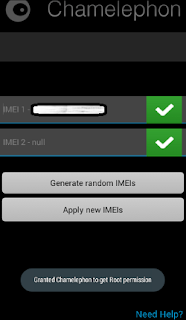
2. Open Chamelephon and grant it super user
permission

3. The first box is for the IMEI of the sim 1, if you
are using a dual sim phone. And the second box
for Imei Sim 2.
chamelephon

4. Input the IMEI number you wish to change to in
any of the boxes. You can simply leave any of the
boxes you did not wish to change the IMEI empty.

5. Then click Apply New IMEIs.

6. A popup box will ask “Do you confirm
changing the IMEIs?”
Click on Change button.
tweaking Imei
7. Close everything and restart your Smart phone or put it in Airplane mode and take back it to normal mode. then dial *#06# to view your new IMEIs.


Note that Changing of IMEI is illegal in some countries, and Gistpluz.com will not be held responsible for any consequences that befall the changer. Also, backup your original imei incase anything goes wrong, then revert using the above procedures for changing.


Good Luck and don't forget to drop your testimony, when succeeded in changing your phone IMEI. You can as well drop your comment for any help.

Sunday, September 13, 2015

Hot- Etisalat Unlimited Browsing for the month on September Via Open Vpn Connect (updated)


Etisalat Unlimited Downloading Is Here Again Using
Open Vpn Connect

The Last Etisalat Tweak Was Etialat ChatPack Unlimited Via Psiphon .

You Can Also read About the Mtn One week free Browsing Here

Now How to Activate the Etisalat free browsing via Open Vpn

See - Etisalat Browsing Unlimitedly And
More Faster With Tweakware .

Firstly deactivate any active chatpack on your Etisalat sim by
dialling *343*5*0#

Den load #100 on your etisalat and dial

*200*3*3*2*1*1#

That is the Etisalat daily smatpack plan but it doesn't expire

Its unlimited as far as you do not load on the sim again, you
will never get any problem.

How Does this Etisalat free browsing via Open Vpnwork?

1. Go to your playstore and Search for
OpenVpn Connect ,Download and install

2. Download free open VPN
profile settings HERE to your memory card

See - Simple Way to Bypass The Unlimited Etisalat
Social Pack Throttling

3. Open your open vpn connect, click on options or menu,
you will see import, click import and click on import from
SD card.
Locate the file and select

4. Openvpn connection details

•Username: vpnbook
• Pa$$word: s6EdUrak

after that, click on save and connect.


See- Download Updated Version of Psiphon
Handler and enjoy Etisalat Smartpak with
new settings

When connected, just minimise and start surfing d net for
free

New mtn 8gb loading.(Stay in Touch )

Saturday, September 12, 2015

Hot cheat- Mtn UnLimited Download for One Week For free (September Cheat)

I know that most of you Are Seriously in Need of Free Browsing tweak. But Disappointed that there is None. Buy we can still Flex this Mtn Unlimited one week browsing Via Simple Server.


Hot cheat- Mtn UnLimited Download for One Week For free (September Cheat)


Send a text message ENTER to 7801 and after that you will receive a reply in this format :


We are pleased to you! As an exclusive member, you have a fun week ahead: browse for 7 days and download 10 games! (Valid for 1 week).


After receiving this message just go straight
to your Access point and create new Access point

Apn - web.gprs.mtnnigeria.net

IP - 127.0.0.1

Port - 8080

then open your simple server and configure it with the below settings :

Listen port : 8080
Proxy host : 10.199.212.2
proxy port : 8080
Injection method : GET
Injection query/Url : http://mtnng.appplus-sys.com
Injection host : mtnng.appplus-sys.com
Injection line : Enter Key '4 times'
.
After setting it, Connect and Power all Apps with #Auto proxy or #Proxy Droid.

brows and start flexing/surfing the net with the Mtn Unlimited Free Browsing for one week.

Any question comment here and Share this post!!

Tuesday, September 8, 2015

First Pure Android Smart phone From Nokia- Nokia C1

Nokia has once dominated the smartphone market,
thanks to their incredible Symbian telephone series
that runs the Symbian platform, until it was once
marched by way of the massive Apple's iPhone that runs
iOS and the tremendous vigor Google's Android in smartphone war I,
nevertheless, Nokia
survived!

Read- Five Important Reasons
why you should not
use the New Tecno
Camon c8


There have been rumors that Nokia is coming back
to smartphone market, categorically to Android
market after the manufacturer suffered a suite back in
their earlier release of low-finish Android telephones
which runs a modified Android variant, the
Nokia X and Nokia XL, which expertise they
deliver is not near that of a pure Android gadget.

Read- Useful Dangerous Apps
you should Use on your
Rooted Android Phone


Again in 2011 when Microsoft signed a handle the
Finland-centered manufacturer to use Microsoft
windows phone operating method on future Nokia
mobile instruments. 2 years later after which Microsoft
announced the Nokia mobile phone industry used to be
acquired with a deal worth of US $7.17 billion, it
was once printed that a covenant to not compete(CNC)
used to be imposed which has avoid Nokia from
manufacturing its possess handsets for a period of
time.


The above photograph is one of the leaked images from a
China source that backs the rumors that Nokia has
a new Android smartphone in work, called
Nokia C1 it's expected to run the trendy
Android OS, Android lollipop, it's going to be the
Finnish tech corporations first device going for walks a pure
variant of Googles Android operating system.


Read - Samsung Galaxy Note5
Full Review and
Specification


The
Nokia C1
reportedly to be a excessive-finish smartphone
points mighty specifications akin to a 5.Zero-inch
HD show of 1280 x 720 monitor resolution with
an unspecified but fine Intel processor powered
with 2 GB RAM, it's Camera is rumored to have
a essential camera of 8MP and secondary digital camera
of 5MP.

Recommended- Tecno Camon C8
Hands- on Review:
Complete phone
Specification and
pricing


With the details noticeable, i feel Nokia quite
mean trade with the brand new Android phone. For
all Nokia fans available in the market, it is a first-rate information for
you.


In the meantime, it has been settled that the company will
indeed go back to manufacturing smartphones … but it’s a bit
more complicated than than. Check out our Nokia Back
To Smartphones: The Night Of The Living Dead? article
for more details


While Nokia did release a handful of Android-powered
devices already, the experience they deliver is not even
close to what a pure Android device would offer. These
low-end terminals – like the Nokia X and XL – run on
heavily forked / modified versions of Android, and not in a
sense of simple customization.

However, earlier this year there have been some leaks
suggesting that Nokia might release a new higher-end
smartphone with a more close-to-vanilla Android OS. A
so-called “Nokia 1100” was spotted in the Geekbench
database too, but while it was listed as an Android 5.0
device, the specifications were not that impressive. On the
other hand, there have also been rumors of a so-called
“Nokia C1” higher-end smartphone, and more to the point
at hand, today we came across a series of renders that
might depict the phone’s final design.


Quick Specification


NETWORK

Technology:  GSM / HSPA
2G bands GSM 850 / 900 / 1800 / 1900
3G bands HSDPA 850 / 900 / 1900 / 2100
Speed : HSPA
GPRS: Yes
EDGE: Yes
LAUNCH
Announced Exp. announcement 2015, Q3
Status Rumored. Exp. release 2015, Q3
BODY
Dimensions -
Weight -
SIM :Yes
DISPLAY:
Type IPS LCD capacitive touchscreen, 16M colors
Size: 5.0 inches (~66.0% screen-to-body ratio)
Resolution: 720 x 1280 pixels (~294 ppi pixel density)
Multi touch: Yes

PLATFORM
OS Android OS, v5.0 (Lollipop)
Chipset Intel
MEMORY
Card slot To be confirmed
Internal 32 GB, 2 GB RAM

CAMERA
Primary 8 MP, 3264 x 2448 pixels, autofocus, LED flash
Features Geo-tagging, touch focus
Video 1080p@30fps
Secondary 5 MP

SOUND
Alert types Vibration; MP3, WAV ringtones
Loudspeaker :Yes
3.5mm jack: Yes

COMMS

WLAN Wi-Fi 802.11 a/b/g/n, dual-band, Wi-Fi
Direct, hotspot
Bluetooth v4.0, A2DP
GPS Yes, with A-GPS, GLONASS
Radio To be confirmed
USB microUSB v2.0

FEATURES
Sensors Accelerometer, proximity, compass
Messaging SMS(threaded view), MMS, Email, Push
Mail, IM
Browser HTML5
Java No
- MP4/H.264 player
- MP3/WAV/eAAC+/FLAC player
- Photo/video editor
- Document viewer

BATTERY
Non-removable Li-Ion battery
Stand-by
Talk time
MISC
Colors: Black
.

Monday, September 7, 2015

Five Important Reasons why you should not use the New Tecno Camon c8


Tecno Camon C8 is the modern-day flagship gadget from Tecno and the web is filled with the information of this gadget. One blog or the other is talking about how wonderful the Smart phone is and a few even claim is the Infinix Killer. In my possess opinion i suppose thc Tecno Camon C8 is over-hyped and its not even worth the rate and all the attentions given to it.


image


Its true that the Camera is awesome, I will not deny the awesomeness of the camera but except from the camera tell me why i should buy this Tecno device? Huh…

Before i tell you  the 5 Things The Tecno Camon C8 Lacks i think you should know the specifications.

  GENERAL FEATURES 


Platform: Android 5.0 (Lollipop)
Processor: 1.3GHz quad-core Processor
GPU: –
Memory: 1GB RAM
Colours: Numerous Colours
Dimension: –
Weight: –
SIM Type: SIM1: Mini-SIM, SIM2: Micro-SIM
SIM Count: Dual SIM, Dual Standby


  DISPLAY


Display: 5.5-inch Touch Display, 720 x 1280 pixels (267 ppi)
Display Protection: –

Few Things You Should
know About The New
Android Marshmallow


  CAMERA


Rear Camera: 13 MP Camera, HD Video
Rear Camera Features: dual-LED Flash, Autofocus
Front Camera: 5MP Camera, LED Flash


  STORAGE


Built-in Storage: 16GB Storage
Memory Card Support: Yes, up to 32GB
Bundled Cloud Storage: –


NETWORK SUPPORT


2G GSM: 900 / 1800 MHz
2G CDMA 1X: No
3G WCDMA: 900 / 2100MHz
3G CDMA EVDO: No
4G LTE: No


INTERNET & CONNECTIVITY


GPRS: Yes, up to 48kbps
EDGE: Yes
3G/WCDMA/HSPA: Yes
HSPA+: Yes
CDMA EVDO: No
4G LTE: No
WLAN: Wi-Fi 802.11 b/g/n
Wi-Fi Hotspot: Yes
Bluetooth: Yes, Bluetooth 4.0 with A2DP
NFC: No
Infrared Blaster: No
USB Port: Yes, microUSB 2.0


MESSAGING


SMS/MMS: Yes
Instant Messaging: Yes
Push Emails: Yes
Email Protocol: IMAP4, POP3, SMTP


ENTERTAINMENT


Music Player: Yes, mp3, WAV, FLAC, eACC+
Video Player: Yes, MPEG4, H.263, H.264, XviD
FM Radio: Yes
Loudspeaker: Yes
3.5mm Jack: Yes


NAVIGATION


Navigation: Yes, GPS with A-GPS
Maps: Yes, Google Maps


SENSORS & CONTROL


Digital Compass: –
Accelerometer: Yes
Proximity Sensor: No
Light Sensor: No
Barometer: No
Pedometer: No
Heart Rate Monitor: No
Gyroscope: No
Fingerprint Scanner: No
Iris Scanner: No
Intelligent Digital Assistant: No
Motion Sensing / Gesture Control: No
Voice Control: No
Samsung Galaxy Note5 Full
Review and Specification


OTHER FEATURES


Video Streaming: Yes
Active Noise Cancellation: No
Wireless Charging: No
Water Resistant: No
Dust Resistant: No
Image Editor: No (download at store)
Video Editor: No (download at store)
Document Viewer: Yes
Document Editor: No (download at store)


BATTERY


Battery: 3000 mAh Li-ion Battery


Read Full specification in Details Here


1. Battery


image


In line with research Africans care in regards to the battery ability so much and its the first thing they determine earlier than watching at other elements the gadget have. Everyone knows the circumstances of electrical energy in Nigeria. The Tecno Camon C8 comes with a small 3000 mAh Li-ion Battery, you would feel this battery is adequate but i assure you its too small for the Nigeria electrical energy .
you can just imagine how bad this could be. A lot of people might say the battery is 3k because they don't want it to be heavy and bulky, tell them to check out the Infinix Ho Note with 4k battery and it still comes with a sleek portable and awesome design. How can you enjoy a device the camera with this kind of battery if you are in a occasion taking shots for 5 hours?

2  INTERNAL STORAGE


image


Tecno stated the Camon C8 is notably made for taking photographs. Real its meant for capturing and snapping top notch , colorful photographs but have you ever ever asked how large the dimensions of this pix are? They arrive in mind blowing sizes like 2MB,3MB but with excellent nice. Do you consider 16GB is sufficient? Camon C8 is meant for taking pictures and recording beautiful moments but how lengthy will a 16GB inner STORAGE memory final. I consider the storage reminiscence is just too Tecno will have to have made it 32GB .

Tecno Camon C8
Hands- on Review: Complete phone
Specification and pricing


3. LACK OF USER COMMUNITY :


image


You could have heard about X-membership, that is the Infinix neighborhood for their customers and that is how they help patrons overcome their after market disorders by using creating a thread within the discussion board and persons are free to make a contribution to the discussions. This also brings about 0.33 celebration development similar to custom Roms, Rooting make the most, customized recuperation, Firmwares and so many extra. A number of men and women had been finding it tough to root their newly bought Tecno Camon C8 . Suppose if their is a Tecno community their buyers wont be migrating to Infinix and different top brands.

4.  RAM


image


Are you aware Tecno Camon C8 comes with 1 GB RAM and consists of a quad-core processor clocked at 1.Three GHz. Good i don't learn about you but i believe 1GB RAM is too small for a gadget with so much concentration as the Tecno Camon C8 also the speed and processor makes it look like a gadget intended for youngsters, the Infinix sizzling note comes with a 1 GB Ram and it uses a Octa-Core Processor clocked at 1.4 GHz. Additionally the cost is an excessive amount of for this low finish specification Tecno device.

5.  OTA UPDATE


image


Till this moment am yet to see or hear a Tecno device that ever receives an OTA UPDATE or any kind of Update. What kind of company doesn’t release updates for their devices but releases a similar device with similar design and name but with a new OS. You might not get what am saying but i will give you a clear Example. Tecno P5 was released some years ago with 512MB RAM/2GB ROM running Android 4.2 Jelly Bean, a year later Tecno released Tecno P5+ which comes with the then latest Android 4.4 OS and 1GBRAM/8GB ROM the price is also similar to that of the Tecno P5. Why should you buy a device that doesn’t have future plans for her customers but will rather exploit you by releasing new devices and forcing you to sell or dash out your device to get a new one for one reason or the other. the future seems bright for more upcoming updates probably Android MarshMallow 6.0


.

In conclusion, Tecno will invariably be the bread winner in the case of cheap and cheap Android gadgets they're also the first company to compete against SamSung , Sony , Lenovo and other top brands within the Nigeria Market before they have been hijacked by way of brands like Infinix , InnJoo and many others as a result of their lack of effective on-line promoting, strong Advert, Promos and Banners.

What do you think about this post? Please take time to share and comment on this post and tell us your opinion and what we might have missed.

Sharing Is Sexy

source - www.ayoproxy.com/5-things-the-tecno-camon-c8-lacks/

Wednesday, September 2, 2015

Useful Dangerous Apps you should Use on your Rooted Android Phone

Useful Dangerous Apps you should Use on your Rooted Android Phone


Read - Tutorial On how to root
all Tecno Android
phones


Exceptionally, quite a lot of persons simplest root their telephones simply in view that each person else is doing it. It shouldn't surprise you that there are still a number of individuals available in the market who have no inspiration the probabilities that opens as much as you while you pick to root your gadget.

Granted, you're taking a danger and you've misplaced your guarantee already however then, I see no purpose why you shouldn't make the risk you took valued at it. The benefits of rooting goes beyond having SuperSU to provide root entry to installed apps handiest, there are so many matters you can do together with your gadget provided that you're inclined to discover.

Except otherwise exact, the apps listed listed here can be dangerous and should be used with care. However hi there, it's enjoyable exploring the deep world of Android OS if you know what I imply.

Xposed Installer


This fashionable root app allows for you to switch your gadget with specific the one of a kind modules on hand within the repository. Xposed Installer itself is more like a framework and doesn:t add any specific functionality except you put in modules. I have to warn you though; you can brick your device by using installing this application. It's now not for the faint-hearted.


image


Gravity field is an Xposed Installer module that lets you customise almost the whole lot about your UI. For instance, that you can make a decision to make use of a background image in your notification core, alternate hardware key movements and plenty of extra.

System App Uninstaller


When your mobile phone seller installs bloatwares for your device, that is the correct app you need to take away them. Method App Uninstaller eliminates method apps that can't be most commonly eliminated.


image


This app doesn't simplest do away with approach apps, it additionally manages your apps. Nevertheless, it's instructed you shouldn't simply go about uninstalling all method apps unless you're sure of what you're doing.

Greenify


As you utilize your gadget and set up functions, it will get slower additional time and starts lagging. This is as a result of some of your set up apps perpetually running in the backround. With Greenify, you could hibernate these functions and velocity up your gadget.

It's not quite a root app anymore although, but there's a mode that desires Xposed Framework to function.


Disk Digger


Disk Digger is a very valuable app that lets your recuperate deleted documents. It recovers deleted files correct on your Android gadget although you've formatted your SD card.


You must word that the free version only recovers lost graphics and MP4 videos, you have got to install the pro variation if you wish to get well other file forms.

Pimp My ROM


that is yet another app that lets your additional personalize your running process and make matters work simply the best way you wish to have. Rom simple tewaks like surroundings WiFi scan intervals to advanced ones like atmosphere minimum & maximum CPU frequencies, Pimp My ROM is a root app any Android must are trying.


Read - Few Things You Should
know About The New
Android Marshmallow


There are apps and mods you could try out like the Sony BRAVIA Engine 2 and more. Nonetheless, it's told you should use with caution as its nonetheless in Beta. Tampering with what you don't have an understanding of can have terrible penalties. Even those you're sure of can send your phone into a bootloop.

Lucky Patcher
This is likely one of the first apps I by and large set up after rooting my gadget. For each and every app, that you can open the patch menu and do a couple of things like getting rid of license verification, getting rid of commercials, changing permissions and extra.


Some apps too also aid the customized patches preloaded together with your fortunate patcher install.

Freedom


builders ought to generate income to proceed developing superb apps for us. I do not support cracking in anyway. However, this app tends to circumvent in-app purchases.


Read - Samsung Galaxy Note5
Full Review and
Specification


IFont


just as the name suggests, this app alterations the font for your device. There are different fonts to selected from. This doesn't always need root entry on some contraptions like Samsung, Xiaomi and Huawei however you won't be in a position to make use of it with out root access on other devices like HTC and Sony.


Read - Tecno Camon C8
Hands- on Review:
Complete phone
Specification and
pricing


ES File Explorer


ES File Explorer is more than just a file explorer, it has hundreds aspects and i suppose the title given to the app underestimates its capabilities. With root access, it will possibly act a root explorer to entry process files in the event you must.


There are additionally other elements you should utilize with out rooting your device like transferring files over WiFi.


Give this a Try. and Comment if you got any question.

Source- Geek.ng

Monday, August 31, 2015

How to Enjoy 40 Minutes Free call on Mtn For Month of August

Screenshot

Read Tecno Camon C8
Hands- on Review:
Complete phone
Specification and
pricing


How to Enjoy 40 Minutes Free call on Mtn For Month of August

Let keep on Rocking Free browsing tweaks and call tweaks until we are tired!!!


Read HOW TO GET 3GB ON
YOUR GLO SIM WITH
JUST N1000


How to Enjoy 40 Minutes Free call on Mtn For Month of August


Transfer #50 Or Minimum of to the MTN
Sim….

After you Have transfered the Airtime then Dial *142#

Immediately, Minimum Of #30 Will Be Deducted
From Your Account And You Will Given #96#
Worth Of Airtime.…


Read :- 3 Easy Steps on How to
Unroot your Android
Smart Phone


Make sure you are on MTN iPulse or
True Talk.


It last for just a week.. If you are
eligible. You will receive it instantly. Try it and drop
your testimony.

Thursday, August 27, 2015

Few Things You Should know About The New Android Marshmallow


Ten Things You Should know About The New Android Marshmallow


Android M(Marshmallow) has started to achieve traction due to the fact it
was first unveiled at Google I/O n may 28, 2015.
This new Android mobile running procedure is
taken with incremental upgrades and have
additions. A lot is anticipated from this today's OS
and to clear the air we have compiled a list
preview of Android M.

Read this  Google to Bring
Another Version of
Android Smart Device -
M (MARSHMALLOW)
6.0


Google's new Android replace is named
Marshmallow and Android
Marshmallow is expected to be
released within the fall.

Here are few Things You Should know About The New Android Marshmallow

1. Screen rotation


You may have wished your home screen rotates
while using your android device. Well Android M
has made this feature available which will allow the
Smart Device to be used in landscape Mode even if
are using applications or you are on home screen.


2. Enhanced Keyboard


Android M  will not only provide a better keyboard
with more personalized experience but will also
allow you to use a third party keyboard software
to be used as default. This will allow users to use
the keyboards which they are most comfortable
with.


3. Better storage capacity

Android M will have an improved and simple way
of showing the amount of storage available.
Storage will have simple line bars to display the
amount of storage consumed by various apps and
the amount of internal storage space available for
you to install new apps.


4.Notification syncing

Android M will support syncing of app notifications
for multiple devices. Android M will allow all
Android based devices synced in a way that
whenever you delete a notification from your
Smartphone, it will get deleted from your tablet or
any other smart devices running on Andriod OS.


5. Integration with Car and Home
gadgets

Android M would run on a forward looking
technology which will allow your Smartphone and
tablets to be integrated with your car. Android M
will allow you to pre plan your route through
GPS of your hand held device before entering
your car which will then be synced with GPS of
your car. You can also decide your playlist before
hand through your Smartphone which will be
played in your car while you commute. Android M
will also allow syncing of various home gadgets
which could be operated with voice commands.


6. Battery Saver

The biggest concern for Smartphone and tablet
users is running out of battery. With the increased
dependability of smartphone’s and tablets it has
become very important for these devices to optimize
battery usage. Android M is anticipated to have an
inbuilt battery saver function which will provide you
extra 90 minutes of battery


7. Guest and parental control

The guest control option will allow you to provide
a limited access whenever you give your phone to
anyone else. You would not want your personal
credit card information in the hands of anyone else
or children to get access to your important files.
Android M will provide a Guest option which is
way above the access control options seen any of
the previous version of Android.


8. App Drawer fixed

The Android M will replace the horizontal
scrolling pages from Lollipop with a vertical list.
Previously the apps were fixed alphabetically which
had a lot of wasted space. The icons in Android
M will be smaller which will fit in a compact
Grid. You would be able to search the apps using a
search bar and the four recently used apps are
listed across the top. The app will require a very
less time scrolling.


The developer preview has created a variety of
anticipation for Android M . Whether its native
help for fingerprint recognition to free up gadgets
and authenticating Play store or new vigor
management scheme often called "doze", Android M
is undoubtedly a step forward to it predecessors.

posted from Bloggeroid

Wednesday, August 26, 2015

Samsung Galaxy Note5 Full Review and Specification

Galaxy Note 5 is arguably probably the most
radical phablet launched to this point by
Samsung. The newcomer points a
noteworthy departure exclusive from
all if its predecessors in phrases of both
design and hardware it aspects.


Samsung Note 5 image


Read  Tecno Camon C8 Hands- on Review: Complete phone Specification and pricing


All of us must anticipate something high
on the subject of Samsung Galaxy
note. The newly launched phablet via
Samsung can provide an awfully excessive
anticipated specification because it packs essentially the most
strong chipset within the business, the
quickest reminiscence ever and one of the vital
high-quality cameras that you could ever get from a
phablet. It also comes with a S Pen
(clickable and more productive than
ever).

Samsung Galaxy Note5 Full Review and Specification

Operating System:

The Samsung Galaxy Note 5 runs on
the latest Android 5.1.1 Lollipop with
TouchWiz UX, you will have an
intuitive interface that you can tweak
to suit your personal style.

Storage: The Samsung phablet comes with a 4GB RAM and a 32/64GB internal memory which can accommodate as many files you want to save on your device but it does not come with a microSD card slot.

Read  -


Xiaomi, the Apple of
China, will soon be
Available in Nigeria &
other African Countries


Performance:
The phablet is packed with a Octa-
Core CPU quad 2.1GHz & quad
1.5GHz, Mali-T760MP8 GPU that
delivers the best performance you
want.

Connectivity:

It sports a Cat. 9 LTE network
support; WiFi 802.11 a/b/g/n/ac
(2.4/5GHz); GPS, GLONASS and
Beidou; Bluetooth 4.2; NFC; MST
mobile payment support which gives
you the best you want.

Read  Apple may finally
release 12.9-inch iPad
Pro with Force Touch
stylus this year


Camera:

The Samsung Galaxy Note 5 is one
phablet made for photo, selfie and
video lovers, the smartphone features
a 16MP f/1.9 camera with OIS; Auto
HDR; 4K video capture; IR white
balance detection sensor, Pro mode
and RAW shooting and a 5MP front
camera to take selfies anytime you
feel like taking them.

Read  Google to Bring
Another Version of
Android Smart Device -
M (MARSHMALLOW)
6.0


Battery:
The Samsung Galaxy Note 5 comes
with a 3,000mAh non-removable
battery that last longer than you
think. With this you can make use of
your phablet for hours playing games
and listening to music.

Source - Google

What do you think About this Device?

Tuesday, August 25, 2015

Tecno Camon C8 Hands- on Review: Complete phone Specification and pricing

For about ten days, A friend of mine have owned the new
Tecno Camon C8 and it has been an
amazing Smartphone. We unboxed the
device last week and there’s a video on
that in this article . Tecno Camon C8’s
major selling point is the camera and
we actually tested this. More on that
later as we go deeper into the review.

image


We may tend to center of our  attention particularly on
the digital camera afterward within the article as this
is the foremost selling factor of this gadget.

First Impressions

In the event you maintain this phone for the primary time,
the first thing you notice is that it feels
light for a 5.5³ gadget. I doesn't consider
bulky not like different instruments of the equal
reveal dimension out there correct now.
Once more, the design is precise and doesn't
seem like every other device round. I
is also fallacious although and i stand to be
corrected.

Pros & Cons

Tecno
Camon C8 has a better battery with
3000mAh capacity. Tecno Camon C8 is
well designed and looks like a premium
device. Android L plays well with a 64-
bit processor and phone performs well
despite sporting only a 1.3Ghz quad-
core processor. The camera also
produces bright pictures that still retain
quality when zoomed to a reasonable
extent.

What’s not so good: The 1GB RAM on
the phone puts a limit to how you
multitask. You’re limited to 1GB of RAM
capacity. However, this doesn’t imply
that the phone is slow in anyway.


FAST AND Quick Specifications


Before going into the review proper,
you might be interested in the quick
specifications.


ROM: 16GB
RAM: 1GB
Display: 5″
Resolution: 720×1280
Micro SD: up to 32GB
OS: Android 5.0 Lollipop
Camera: 13MP primary, 5MP
secondary
Battery: 3000mAh
Processor: 1.3GHz quad


Design & Physical
Appearance


Tecno Camon C8 is superbly
designed and for a Tablet, it doesn't
think too heavy. I for my part love the
design and just about the whole thing about it.
The gadget has a 5.5³ Screen with
softkeys positioned beneath the reveal. The
entrance digital camera is on the top-left with the
LED flash and light sensor positioned
beside it.
image

The silver colored frame adds to the
overall beauty of the device. At first
glance, it looks like metal but it’s
actually plastic.The home button and
softkeys are backlit with white LED
light. The home button also lights up
and blinks when there’s a notification.

Bezels are getting thinner on
smartphones and the general norm is
that wide bezels are unappealing. The
bezel on this device is minimal, it’s not
particularly thin but very moderate.

The back cover is removable but the
battery isn’t. The back cover has a
leather grain texture and looks similar
to that on the Phantom Z .
image

When you're any one who has on no account used
a cell with a committed digital camera
button, you may in finding yourself
mistakenly pressing the one on the
slash correct side of the Phone.

image

This button makes it less complicated taking
snap shots and selfies with one hand. It's
even less difficult if you're looking to take a
selfie with the back camera. The vigour
button can be on the higher a part of the
correct side.
image

Again Back camera has a dual flash that
enhances taking portraits at the hours of darkness.
There's a snapshot proven later within the
publish taken in pitch darkness. The 13MP
digicam isn't simply built-in with the
rest of the back duvet to combo in, it's
intentionally designed to stand out.

image

The removed back cover shows the
3000mAh battery, two sim slots (mini &
micro) and a SD card slot.
image


THE Display
The device has a 5.5″ HD screen with a
resolution of 720×1280 and the display
looks great. Images appear crystal clear
and the display is enhanced by
MiraVision engine.


Camera & Picture Quality


Tecno Camon C8 is a digicam telephone and
of course, I was once ready to take some
breathtaking graphics with superb
exceptional. The snap shots taken nonetheless
hold the quality and don't rapidly
get blurry when zoomed in. The colours
look almost normal and this under was once
taken in wide daylight on a alternatively
cloudy day.
image

Also, the pictures in the gallery below
were taken during the day. The fixed
aperture is f/2.8 but the shutter speed
varies. Click on any of them for a larger
image opened in lightbox.


image

image

image

And here’s one taken in pitch darkness
around 11pm:
image


Low Light Photography
Challenge: Tecno Camon C8
vs Huawei Honor 6 Plus


Given that the only source of light was
the dual flash, the digital camera produced a
just right photo. Nevertheless, I used to be anticipating
to see a night time mode to further open up
the aperture and gradual down the shutter
pace much more with the intention to take photos
with out the flash. This could've been
superb for low gentle photography when
you pick not to use the LED flash. I
tried this and wasn't too eager about
the effect:

image

And here is another picture taken with
Huawei Honor 6 Plus from the same
point right about the same time:
image

As you will find, the second photo taken
with Honor 6 Plus is extra precise. It
used to be taken under the equal lighting
condition with out a further camera settings.
Anyway, each instruments aren't within the
same cost variety and we shouldn't
even be evaluating them, we are most effective
doing some benchmarking right here.

For a phone that costs around 20,000
NGN, the camera isn’t bad. With the
dual flash enabled, it can take some
pretty nice photos in the dark: I mean
in pitch darkness without a single ray
of light. Indoors with no flash, however,
the picture appeared noisy when the
lighting condition is rather poor.


The digicam has distinctive modes for
capturing snap shots. It helps excessive
Dynamic Imaging (HDR) which
enhances your photographs when used at
the proper time. There's Face magnificence
mode for boosting faces in graphics,
Panorama mode for taking a photograph
covering a wide angle at the same time slowly
moving the digicam & PIP mode that
makes use of the rear and entrance digicam to
produce a mixed image.


The 5MP front camera too is flash
enabled and allows you take pictures
even in the dark. I took a shot in broad
daylight outdoors and the produced
image look a bit too sharp though.
Anyway, I’m not a selfie freak, I was
more interested in the primary camera
which performed well.


Software, Hardware &
Performance


Tecno Camon C8 runs a customized
version of Android Lollipop 5.0 (64-bit)
but I’m assuming there’s a planned
upgrade to Android 5.1. The UI is a
customized and looks pretty good.
image

Google apps are pre-installed and there
are others like Facebook, Opera Mini,
UC Mini, DU Speed Booster and more.
image

The phone responds to touch and
there’s no noticeable lag when
navigating the phone. Tecno Camon C8
has a 1.3GHz 64-bit quad-core
processor. Theoretically, 64-bit
processors are faster and more efficient
than 32-bit processors and the ART
runtime now enabled on Lollipop
makes it all better.


Memory
There’s a 16GB ROM out of which the
OS takes about 5GB leaving a little over
about 10GB left. That’s not really a
problem as there’s a slot for external
memory supporting up to 32GB SD
card.

The phone has a 1GB random access
memory. It’s sufficient but in this age,
huge specs sound magical and a lot of
people are of the opinion that the
phone should’ve come with a 2GB RAM
capacity.


Multimedia

Tecno Camon C8 also has the new
proprietary music software found on
Tecno Boom J7 , Boom Player. I tried
comparing the sound quality of the
speaker with that of Tecno Phantom Z
and I was amazed. It sounded way
better than Tecno Phantom Z and the
quality was good.

I should mention that I dislike the
speaker placement though. It’s at the
back of the device and this impairs that
quality sound when playing music and
the phone is lying on its back.


Battery

The non-removable battery has a
capacity of 3000mAh that’s more than
enough. I was able to use it for two
days without charging but I must
mention that I didn’t put the phone
through much heavy use and I did some
optimizations here and there. Mobile
data was always turned off when not in
use and I always killed background
applications.
You can exhaust a 3000mAh battery in a
day. We all have different use pattern
when it comes to mobile phones.
The battery saving mode can get you
going for hours with only 20% of
battery left.


Connectivity

Tecno Camon C8 is 3G enabled and can
also connect to the Internet through
WiFi. You can also use your phone as a
WiFi hotspot and share your internet
connection.
For file transfer, it’s bluetooth enabled
and you can as well transfer files via
with other HotKnot enabled MediaTek
devices.


Price
At the moment, the phone isn’t yet
available in stores but the information I
got directly from tecno Mobile suggests
the price should be a little bit over
20,000 NGN

BUY IT NOW FROM KONGA


Verdict

Is this a phone I would recommend?
The short answer to that is “Yes”. The
battery is a big plus and that fact that
it’s not just another Kitkat phone makes
it better. The sleek design makes it look
like a high-end device plus the camera
gives some great shots in daylight. If
there’s anything missing in the phone,
it’s a night mode feature to shoot
pictures without the need to use LED
flash.

However, the price tag puts it in an
interesting position as there are devices
in the market within the same price
range offering higher specifications. But
for anyone who wants a phablet that
can capture good pictures and who
considers that top priority, Tecno
Camon C8 is a multimedia phone and
it’s your best bargain in this price
range.